
Hey there folks, it’s that guy who publishes the PensionPro release notes, back once again! If you’ve been too bogged down with unfinished 5500s lately to keep tabs on what changes we’re making (it’s okay—I totally get it), you might have overlooked our June 23rd update:
Blast Email can now apply a filter that limits potential recipients based on a list of Plans imported from a spreadsheet.
Currently, you’re already using filters in Blast Email to avoid looking at every contact one at a time to choose who the email gets sent to. Even if it’s just something simple like limiting results to a certain plan type or year-end date, you add the filter in the same way: pick which field you’re filtering on, set the condition to check for and away you go.
Which means at some point, you’ve probably run a PensionPro report to see who needs a particular outreach, then spent time trying to carefully construct a series of filters to recreate that list in Blast Email. Well, I have good news: as long as the report includes a plan name or ID, you can now import it to filter recipients by just those plans!
How the New Filter Works
To do this, add either the Plan ID or Plan Name filter to the Blast Email like you normally would—these are the only two fields that are compatible. Then, when you choose an operator for this filter, you will see Contained in file as one of the options. Select this as the operator, and the text field on the right changes to a file import box, which you can use to import your spreadsheet.
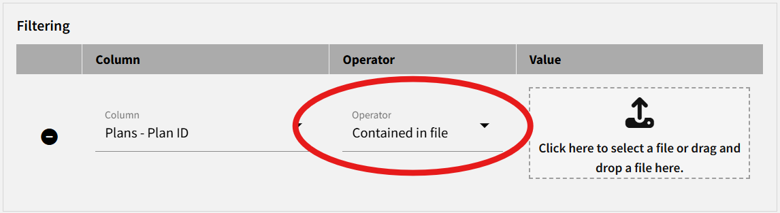
The spreadsheet requirements are straightforward. PensionPro will accept almost any Excel file, so long as it has a Plan Name or Plan ID column. Many of PensionPro’s built-in reports include these items, so if you already ran a report, you can simply export it and use it for the filter; you don’t even need to worry about deleting the extra columns. You can still add the usual Blast Email filters, too, in case you need to narrow the results down further—say, to a particular Plan Contact Role or maybe a merge field in the email body.
Examples of the Filter in Use
Need an example? Use the Plan Documents Not Accessed report to see which plans still have an untouched annual notice on PlanSponsorLink, then import it to send those contacts a polite reminder that they need to distribute it. Of course, there’s no reason why you’d have to limit this to PensionPro reports, either. Is your company’s Billing department asking you to reach out to clients with overdue invoices? Instead of tracking these customers down one-by-one, have Billing provide you with a list so you can turn it into a filter. These are just a few examples, though; we really opened a lot of possibilities with this one! If you have any questions about this filter, submit a ticket to the Help Center.
But hey, speaking of reminding your clients of their to-do list—I’d like to take a second to mention that we recently released Blast Email Automatic Reminders for our AUTOMATE Compliance Bundle! If you’re growing weary of chasing down your plan contacts and begging them to please submit their data collections already, PensionPro can now send reminder emails at regular intervals, never tiring or relenting until they finally go to PlanSponsorLink and complete their data collection. To those of you who have been waiting for the right moment to make the jump, Automatic Reminders might be just what you’re looking for. We’re still offering early-adopter discount pricing if you sign up now. No reason to keep delaying!

Josh Wilson
Documentation & Content Specialist